Body
Issue
Connect the ImageScope application to slides.wvsom.edu
Intended Audience
Students
Resolution
The ImageScope software is used for viewing Aperio slides from the web at WVSOM eSlide. To view the slides, the application must be connected to the server using the following steps:
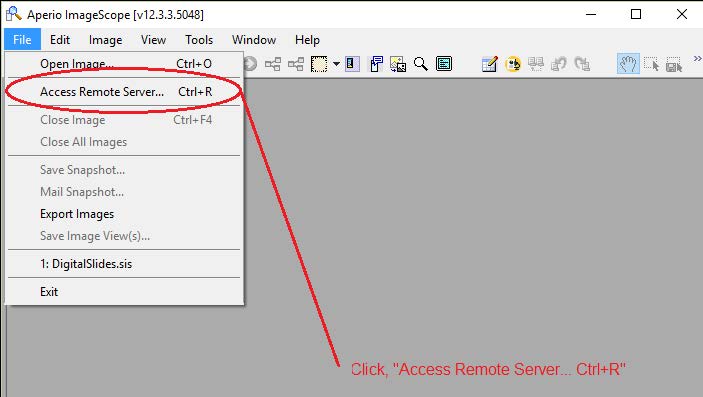
- Open the ImageScope application and select the File tab.
2. Select Access Remote Server.
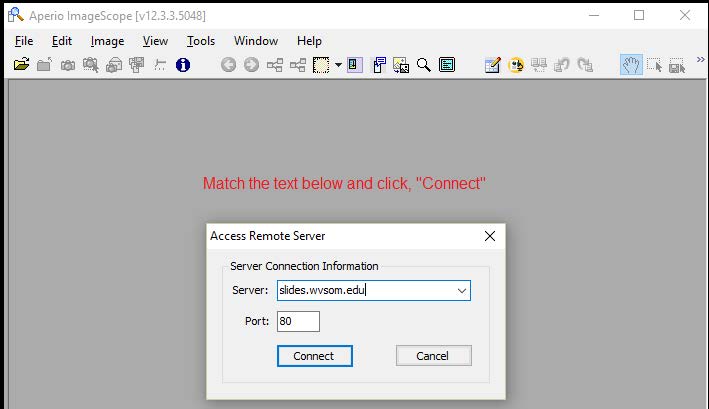
3. In the server field, type "slides.wvsom.edu" and for the port number field type "80", then click connect.
4. A web page will open. Sign in with the credentials provided in your course.
Summary
ImageScope is an application used to view anatomy slides that are stored on a server. Before using ImageScope for the first time, it is necessary to connect the application to the server.